Employee salary and travel allowance
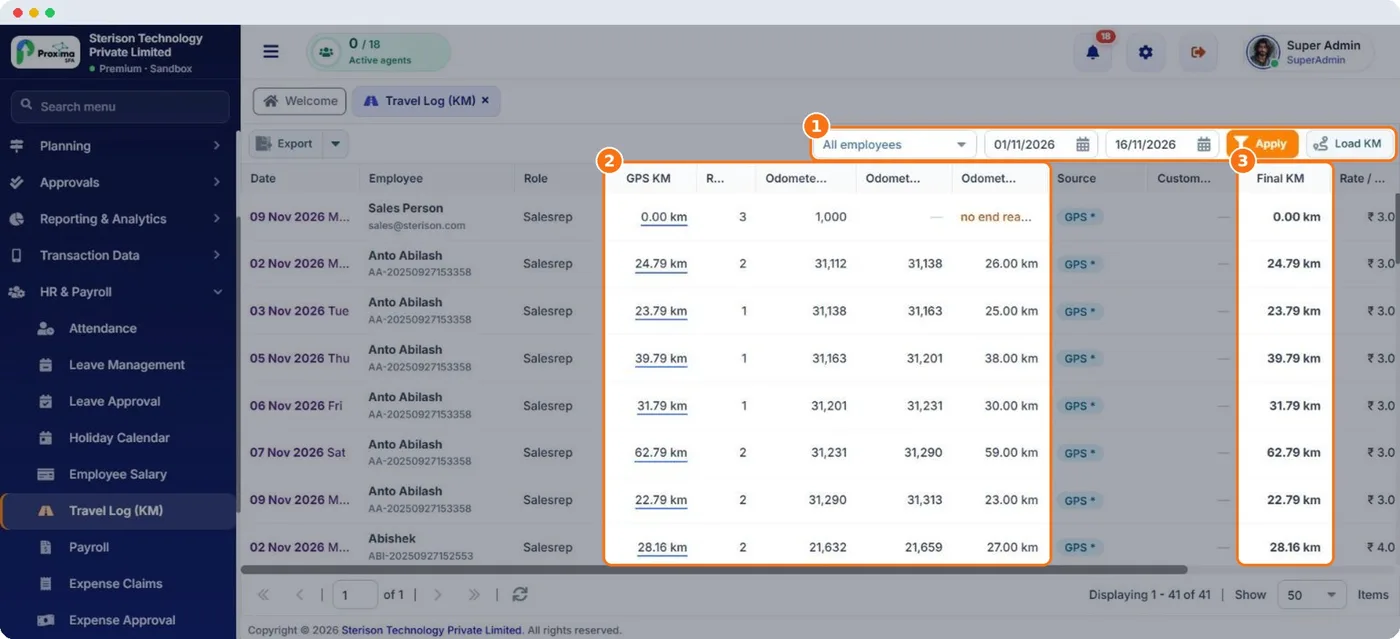
Proxima pays travel allowance on the kilometres reps actually drive, using the GPS track from the field app or the odometer readings they enter.
Employee Salary
Each employee has a monthly salary, a per KM rate and weekly off days. Leave the rate blank or no weekly off ticked to use the company default. To change a salary, add a new row with a later Effective From date; it replaces the old one from that date, so past months stay correct.
Travel Log (KM)
| Source | Where it comes from |
|---|---|
| GPS KM | The distance tracked on the rep's field visits. |
| Odometer KM | Start and end readings the rep enters at the start and end of the day. |
| Custom KM | A figure HR enters for a day, with a reason. |
The KM used for a day is the custom KM when HR set one; otherwise the source chosen for the day or the company default. When odometer readings are missing or invalid, Proxima falls back to GPS. Travel amount is the final KM multiplied by the rate.
Compare GPS and odometer KM side by side in the travel log. A large gap on a day is worth a question.
Related guides: Employee salary · Travel log · Vehicle details and odometer.
Still stuck?
Message our support team on WhatsApp in English, Tamil, Malayalam or Hindi.