What customers see: catalogue, prices and offers
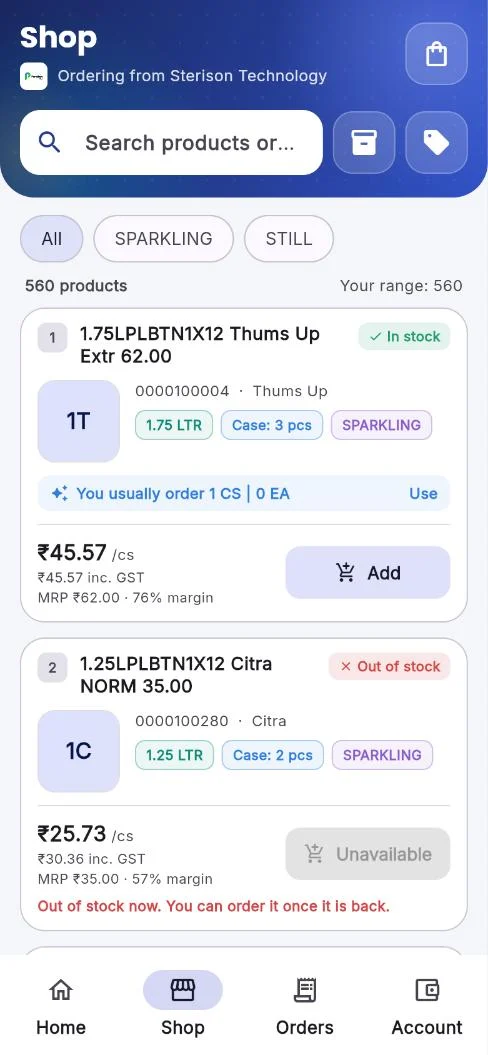
The app shows each customer the same products and prices a rep would offer them, so there is one price wherever they order.
| What | Comes from |
|---|---|
| Which products | Customer Product Mapping: the product groups mapped to the customer's groups, less any brands or categories you hide. |
| Prices | The price rule in Order App Settings: customer price or product price. |
| Offers | Schemes and promotions running for the customer, applied in the cart the same way as in the field app. |
| Stock | Stock at the depot of the customer's rep, shown as in or out of stock, or as a quantity if you choose. |
| Dues | Their invoices, payments and balance on the account page. |
Tip
Check the app as a customer before launch: sign in with a test customer and walk through the catalogue, cart and offers.
Related guides: Prices and customer price lists · Schemes and promotions · Product groups.
Still stuck?
Message our support team on WhatsApp in English, Tamil, Malayalam or Hindi.