Finding customers who stopped ordering
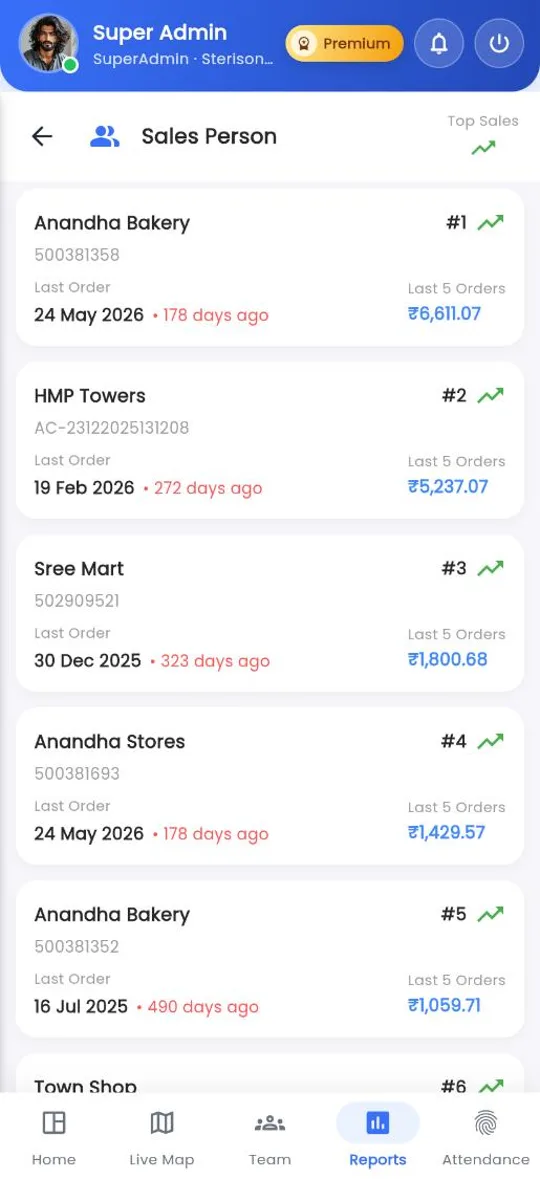
A good shop that quietly stops ordering is the most expensive thing a sales team can miss. Command Center makes it easy to spot.
How to
- Open Reports › Sales performance and pick a rep in My Team.
- Their customers are ranked by the value of their last five orders, with the date of the last order and how many days ago it was.
- Look for customers high on the list with many days since their last order.
- Ask the rep to visit them this week, or hand them to the call center for a call.
Chasing dues
Reports › Outstanding shows the outstanding of each rep's customers. Pick a rep to see each customer's invoices, sales, amount received and outstanding, and agree the week's collection list with the rep.
Tip
Run both reports in the same weekly review. A customer who stopped ordering and still owes money needs a different conversation from one who simply forgot.
Related guides: Sales performance · Outstanding · What the call center is for.
Still stuck?
Message our support team on WhatsApp in English, Tamil, Malayalam or Hindi.