Depot Stock Count
Count what is physically in a depot and correct Proxima's stock to the count. Stock can go up or down: the difference is saved as a Stock Count Adjustment, and every count is kept with its count sheet. Open it from Inventory › Depot Stock Count.
How to
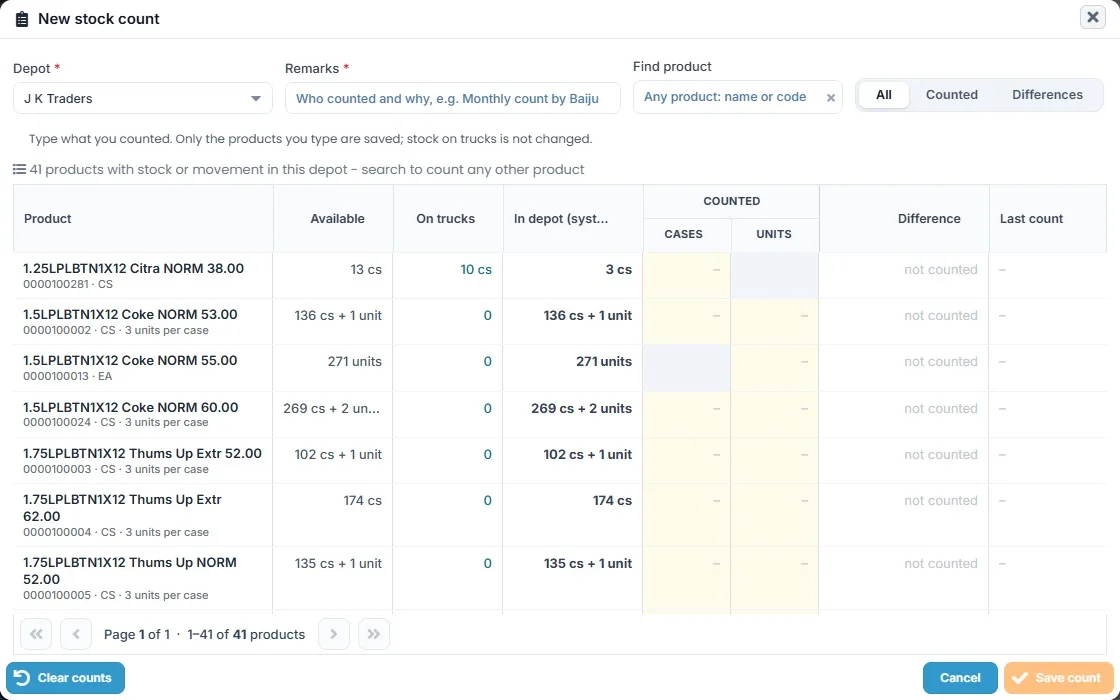
- Click New count and choose the depot you counted.
- Proxima lists the products that moved in that depot, with Available, On trucks and In depot (system). Use Find product for any other product.
- Type what you counted in Cases and Units. The Difference column updates as you type; use Counted or Differences to check only those rows.
- Enter Remarks: who counted and why, for example “Monthly count by Baiju”.
- Click Save count. Proxima shows how many products change and by how many units, up and down. Confirm to save.
| Figure | Meaning |
|---|---|
| In depot (system) | What Proxima says is in the depot: Available minus the stock on this depot's trucks. Your count is compared with this. |
| Counted | What you typed, in cases and units as the product is sold. |
| Difference | Counted minus In depot. Above zero, stock goes up; below zero, stock comes down. |
| Last count | When this product was last counted in this depot. |
- Only the products you type are saved. A product you leave blank keeps its stock.
- Stock on trucks is not changed by a depot count.
- The difference is worked out again at the moment you save, so it uses the latest In depot figure.
- A saved count cannot be edited or deleted. If a count was wrong, count those products again.
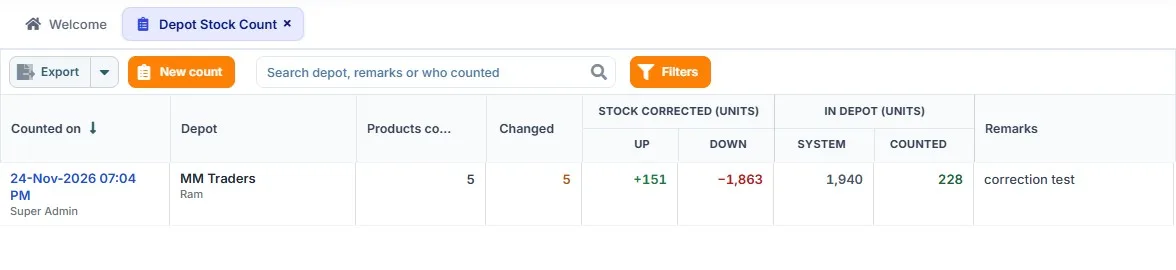
- The list shows one row per count: date, depot, products counted, products changed, units up and down, and remarks. Double click a row to open its count sheet.
Stock Overview shows these corrections in its Count adj. column: Available = Total + Count adj. − Reserved − Sold + Returned.
Tip
Count your fastest moving products every week and the rest every month. Small, frequent counts find problems while they are still small.
Note
When the screen was added, every role with access to Stock Entry was given access to Depot Stock Count. Change it in User & Access › Role Permissions.
Still stuck?
Message our support team on WhatsApp in English, Tamil, Malayalam or Hindi.