Truck Stock Summary
A live reconciliation of every truck: loaded, pre-sale delivered, van-sold, returned to depot, trade returns and available.
How to
- Click Filters; choose Org unit and Depot (required), and optionally truck, executive and movement dates.
- Click Apply.

- 1Org unit & depot (required) · Org unit and depot are mandatory.
- 2Apply · Apply the filters.
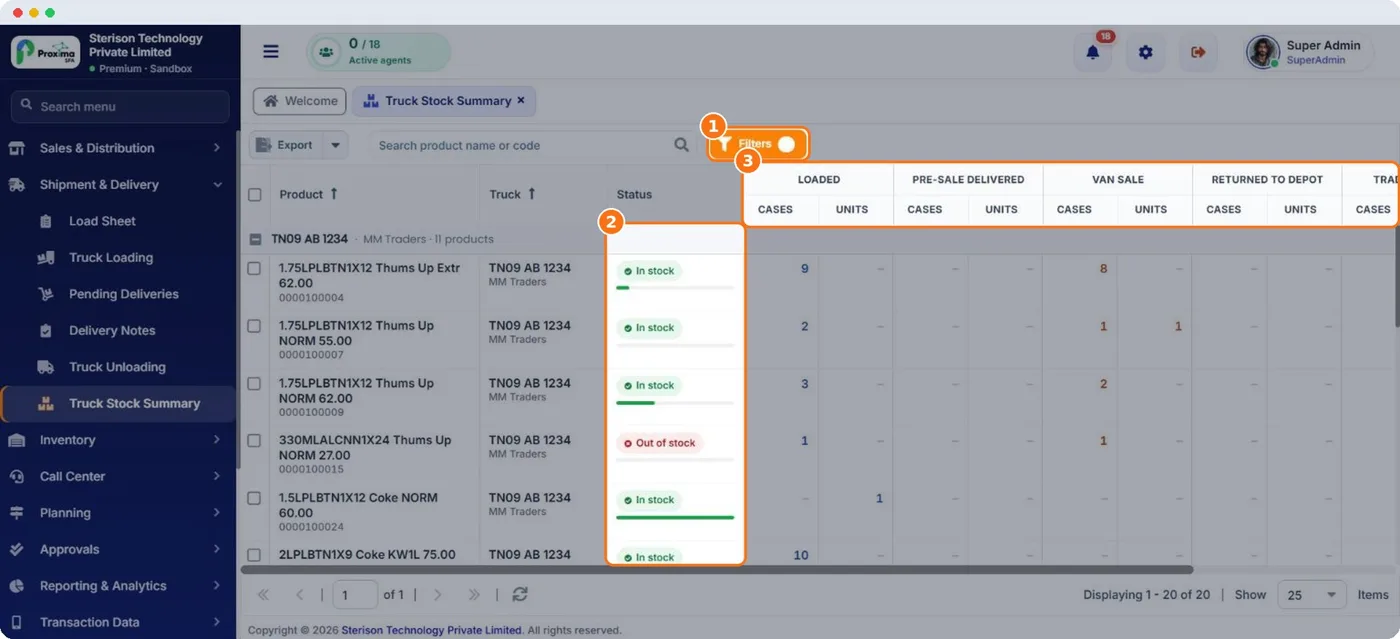
- 1Filters · Re-open filters at any time.
- 2Stock status · In stock / Out of stock per product per truck.
- 3Loaded vs sold vs returned · Movement columns that explain the available balance.
Note
Truck stock on the phone. The field app's truck stock is refreshed at every sync. A cancel, unloading or correction made here reaches the rep's phone at the next sync; no Initial Sync is needed.
Still stuck?
Message our support team on WhatsApp in English, Tamil, Malayalam or Hindi.