The Business Dashboard
The dashboard is your daily control tower. Filter by organisation unit, depot and date range to see the health of the business at a glance.
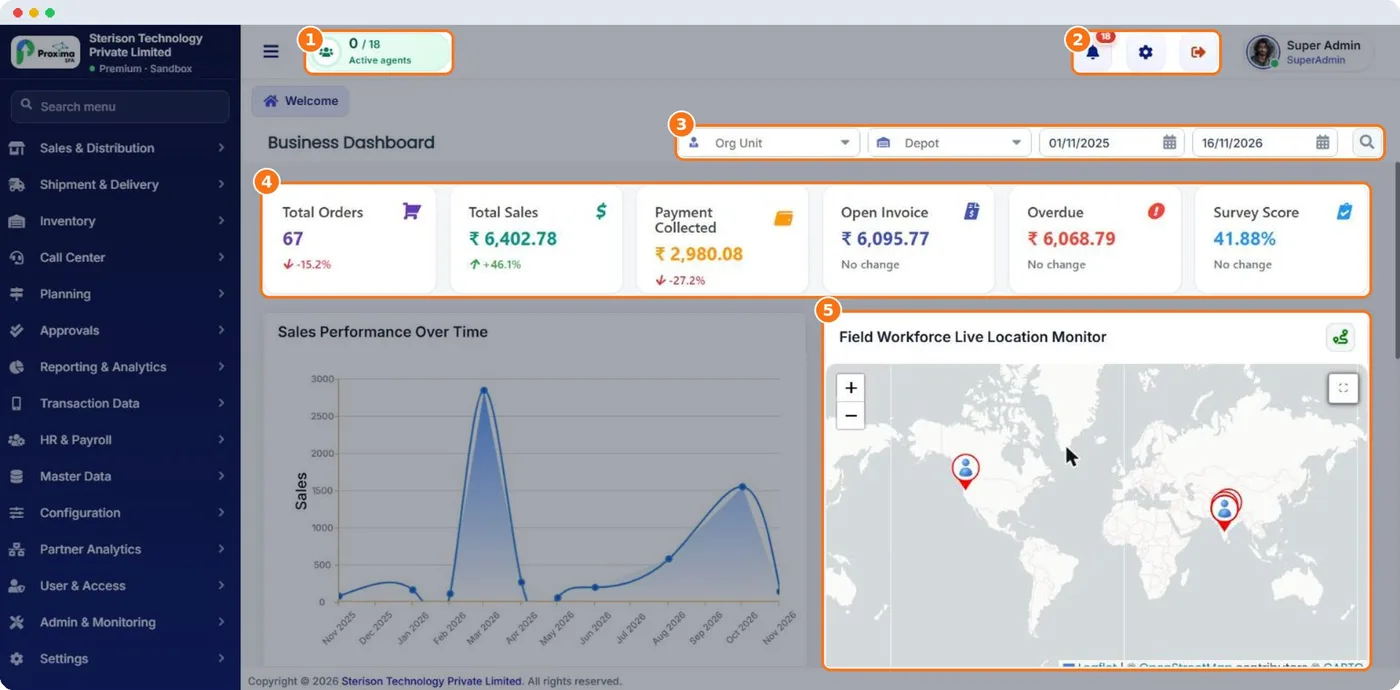
- 1Active field agents · Field agents active right now versus total licensed agents.
- 2Notifications, settings, logout · Notifications (target alerts, approvals), quick settings and sign-out.
- 3Org unit, depot & date filters · Filter every widget by Org Unit, Depot and date range, then click the search icon.
- 4KPI tiles · Total Orders, Total Sales, Payment Collected, Open Invoice, Overdue and Survey Score — each with change versus the previous period.
- 5Live location monitor · Live map of your field workforce; click a pin to see who is where.
Still stuck?
Message our support team on WhatsApp in English, Tamil, Malayalam or Hindi.